
Versnq Technologies · Pune, India
We build the systems
companies actually run on.
Versnq is a one-person software studio. I build internal business systems end to end — and I run AMS, an attendance and leave platform, for companies that need every working day accounted for.
No self-signup, no credit card, no trial that expires mid-month. We set the company up with you.
10
modules live in production
99
permission-checked API endpoints
14
automated test suites, green
1 row
per person, per day — guaranteed
The product
LiveAMS — attendance that holds up at month end
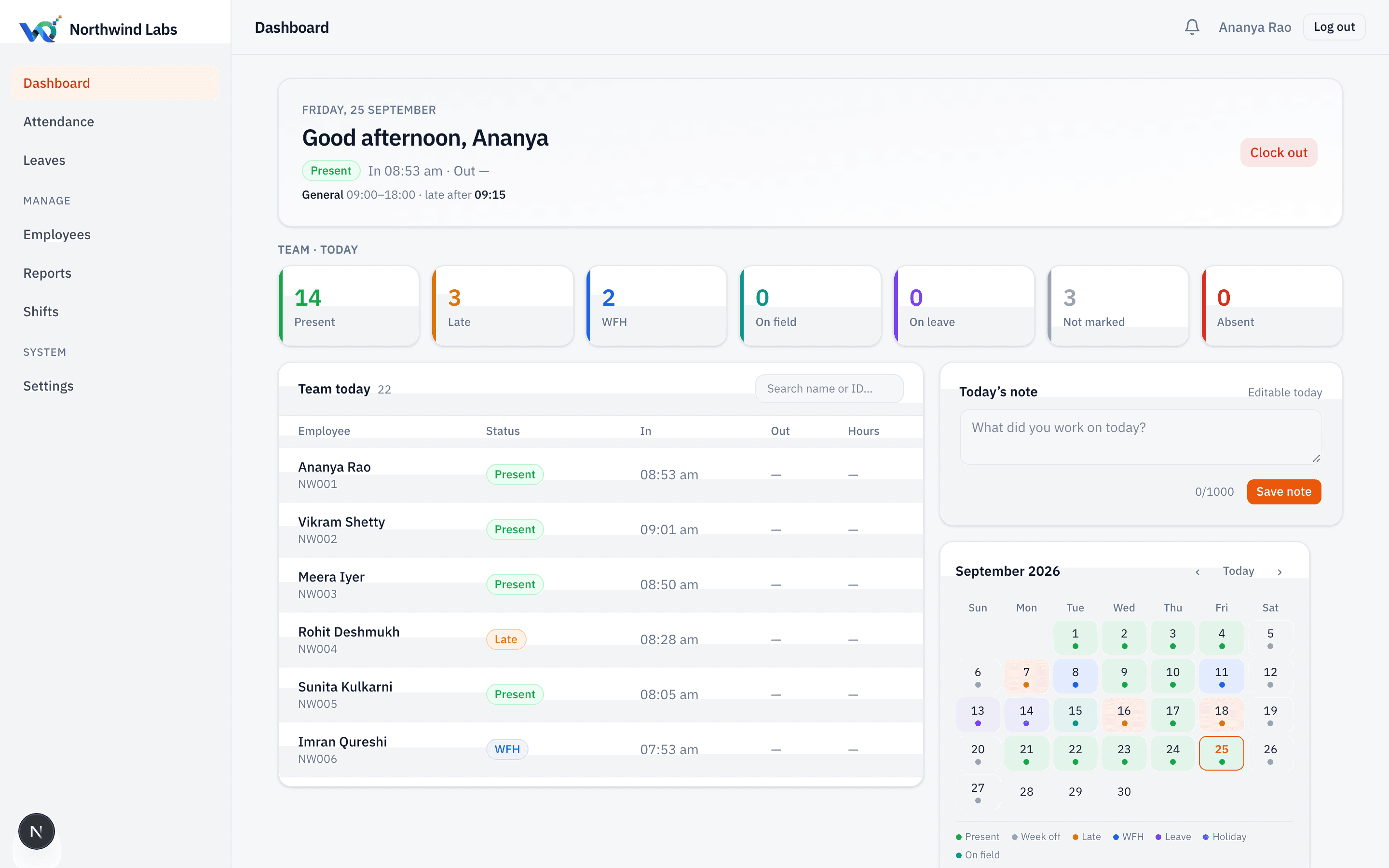
Every company gets its own address and its own isolated tenant. Staff clock in, HR corrects what needs correcting with a reason on record, and the month ends as an Excel file your existing payroll runs from — unchanged.
- Works for staff with no email address
- Per-employee weekly offs and real night shifts
- Every correction audited: who, what, why
- Muster roll and monthly summary, exported to Excel
Why it is different
The four things most attendance software gets wrong
None of these are exotic. They are simply the parts that are tedious to build correctly, so they usually are not.
Ten people, ten days off
Weekly offs are set per employee. You do not create a shift called “General (Wed off)” just to say that Ramesh is off on Wednesday.
Night shifts that cross midnight
A shift ending before it starts is understood, not rejected. The 6am punch-out belongs to the night before, and the muster shows it there.
“Not marked” is not “absent”
One is a payroll decision, the other is a missing punch. Collapsing them is how people get docked a day they actually worked.
An attendance rate that survives scrutiny
Days at work ÷ days due at work — that person's shift, minus holidays, minus approved leave. A Sunday worked does not cover a Tuesday missed.
What is live
Seven modules, each one finished
We do not ship half a module. Everything below is built, deployed and can be demonstrated today — and what is not built is listed just as plainly.
Attendance
LiveOne button to clock in, and a day that is either accounted for or visibly not.
- Clock in and out with a live session timer
- Office, work-from-home and on-field modes
- Late judged against that employee's own shift and its grace window
Corrections & audit
LiveSomeone forgets to punch every single week. The fix is a request, not an argument.
- Employee raises a regularization; HR approves or refuses with a comment shown back verbatim
- Admin can mark on behalf when biometrics fail — a reason is required, always
- Nobody can mark their own attendance through the on-behalf route
Attendance policy
LiveYour rules, enforced by the server rather than by reminders on WhatsApp.
- Detect unmarked attendance after N working days
- Then do nothing, warn the employee and their manager, or block their next clock-in
- Auto-mark absent after N unmarked working days
Shifts & rosters
LiveTen people, ten different days off — without inventing ten shifts to say so.
- As many shifts as you actually run: morning, evening, night, general
- Per-shift working days, so a six-day week and a Wednesday-off week coexist
- Per-employee weekly offs
Leave
LiveLeave types you define, balances that move exactly once, and working days counted correctly.
- Custom types: days per year, half-day, carry-forward with a cap, negative balance, document required
- Apply, approve, reject, cancel — balance moved on approval, returned on cancellation
- Working days computed from that employee's own shift, minus holidays
Reports & export
LiveThe month, as a grid your existing payroll can run from without being re-typed.
- Muster roll: the whole month as a grid, per-employee week-offs shaded correctly
- Monthly summary: present, late, absent, WFH, on field, leave, not marked, hours, overtime
- Attendance rate = days at work ÷ days due at work — a Sunday worked does not cover a Tuesday missed
People & access
LiveStaff without an email address are first-class here, because on a real shop floor most of them are.
- Sign in by employee ID or email — email is optional
- Auto-numbered employee IDs with your own prefix
- Bulk import by pasted CSV, with a per-row error report

Month end
The file payroll actually runs from
Muster roll, monthly summary, attendance register and the analytics — all exported to Excel with real dates and real times, not text that looks like a date until you sort it.
Joiners and leavers appear for the part of the month they worked. People who had not joined yet are named and explained rather than silently dropped. Somebody who owed no days reports “—”, not 0%.
The studio
And when the thing you need does not exist yet
AMS started as a system a company needed and could not buy. Most of our work still starts that way.
Internal business systems
The system a company actually runs on and cannot buy off the shelf — attendance, dispatch, reconciliation, approvals, whatever the shape of the work is. Built as software, not as a spreadsheet with ambitions.
Products, operated
AMS is ours: designed, built, hosted and supported by the same hands. A product we run ourselves is the only honest proof that we can run yours.
Data & reporting
Reports that reconcile. Most reporting work is not charting — it is agreeing on what a number means and then computing it the same way every time.
Integrations
Two systems that each hold half the truth, made to agree. Imports, exports, scheduled syncs, and the error handling that decides whether anyone trusts the result.
How we build
Four rules we will be held to
Never ship half a module
A feature is complete and correct, or it is not there. A half-correct payroll is worse than no payroll, so there is no payroll yet.
The server is the rule
Every permission is re-checked on the server on every request. Hiding a button is presentation, never protection.
Say what isn't built
The roadmap on this site marks what is live, what is designed and what is deliberately deferred. You will not discover a gap after you have signed.
One row per person per day
The muster, the calendar, every report and the payroll export all depend on it. We will not break that guarantee for a convenient feature.
Onboarding
What your first week looks like
Run AMS alongside whatever you use now for one full cycle. Nothing is migrated away from you and nothing is deleted.
Day 1
Company, subdomain, branding and your first admin are live.
Day 2–3
Roster loaded and numbered. Everyone can sign in, including staff with no email address.
Day 3–5
Shifts, weekly offs, holidays and leave types configured to how you actually work.
Month end
An Excel export your existing payroll runs from, unchanged.
Questions
Asked before every demo
Do you support employees who don't have an email address?
Yes, and it is not an afterthought. Staff without email sign in with their employee ID and a temporary password issued by HR, which they must change at first sign-in. On a factory floor or a field team, this is most of the roster.
Can it handle night shifts and different weekly offs per person?
Yes. A shift whose end time is before its start time is understood as crossing midnight, so a night-shift punch-out lands on the right day. Weekly offs are set per employee, so ten people can have ten different days off without creating ten shifts.
Does AMS run payroll?
Not yet, and that is deliberate. Payroll is the one module where a bug is somebody's salary, discovered on payday. Until it is built to the standard the rest is held to, AMS produces the Excel export your existing payroll runs from — real dates and times, one row per person per day.
Does it connect to our biometric machine?
Not yet. It is the most requested item on the roadmap and it is next in that queue. Today attendance is marked by the employee, or by an admin on their behalf with a reason recorded.
Where is our data, and can another company see it?
Each company gets its own address and its own isolated tenant. Every request carries the company on its token and every query is filtered by it, server-side. Keys are UUIDs, so nothing about your size or your records can be guessed from a URL.
Do we have to move off what we use today?
No. We recommend running AMS alongside your current process for one full cycle. Nothing is migrated away from you and nothing is deleted.
What does it cost?
We quote per company, based on headcount and what you need switched on. Tell us your size and we will send a number — there is no negotiation theatre and no per-module upsell.
Next step
See it on your own roster
A working demo takes about twenty minutes, and we will use your shifts and your week-offs rather than a sample company.