Attendance
Attendance management software that survives month end
One button to clock in. A day that is either accounted for or visibly not. And when somebody forgets — which happens every week — a correction that leaves a record instead of an argument.
What you get
Everything this module does
Clock in and out
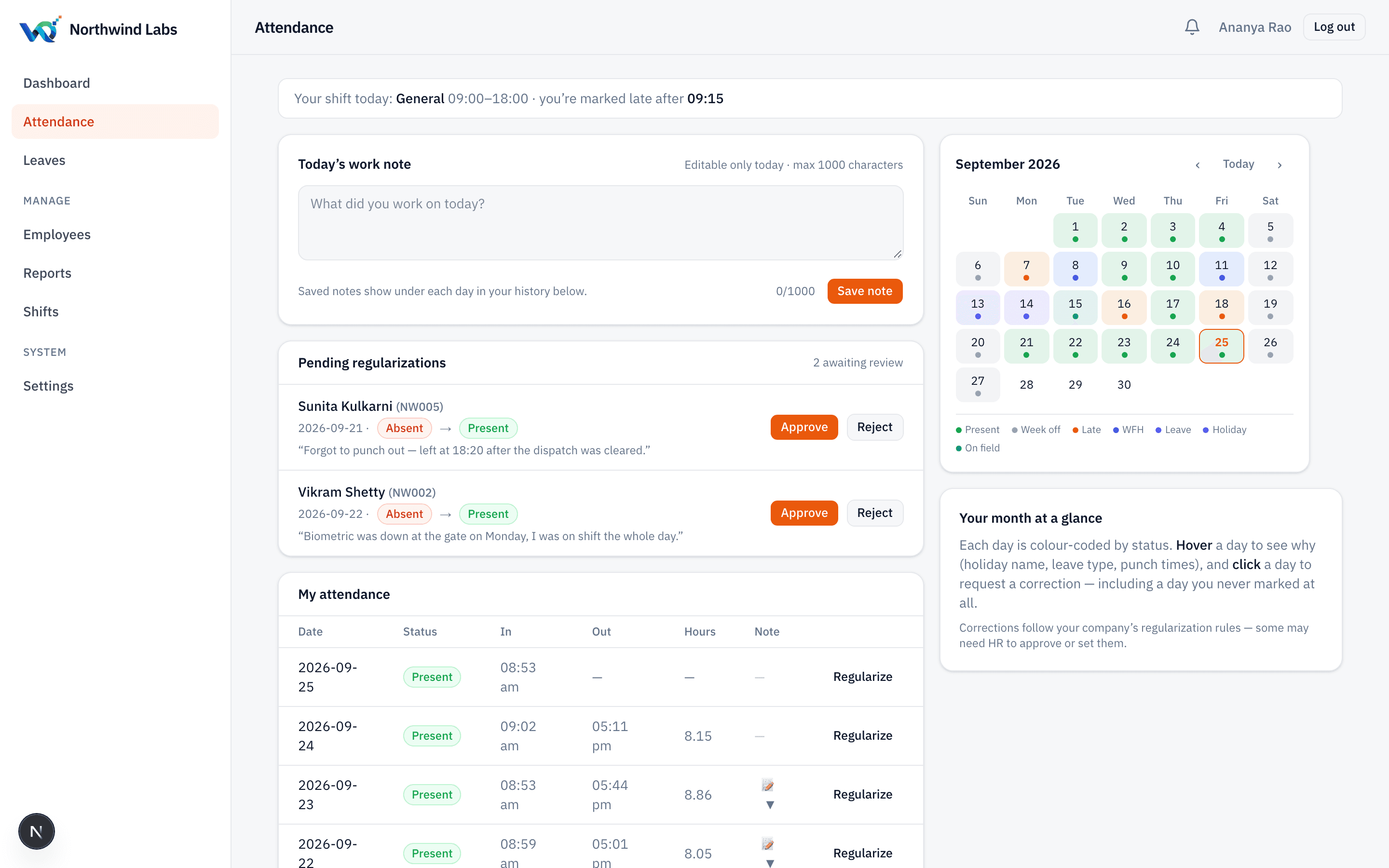
One button, a live session timer, and the current status visible without hunting for it. Office, work-from-home and on-field are separate modes, so remote days are not quietly counted as absence.
Late, judged fairly
Lateness is measured against that employee's own shift start and that shift's grace window, in your company's timezone — not against a single company-wide 9am that half your staff never had.
Night shifts that work
A shift ending before it starts is understood as crossing midnight. The 6am punch-out belongs to the night before and the muster shows it there.
Not marked ≠ absent
A missing punch and a decision that somebody did not come in are different facts with different consequences. AMS keeps them apart, so nobody loses a day they actually worked.
Corrections with a trail
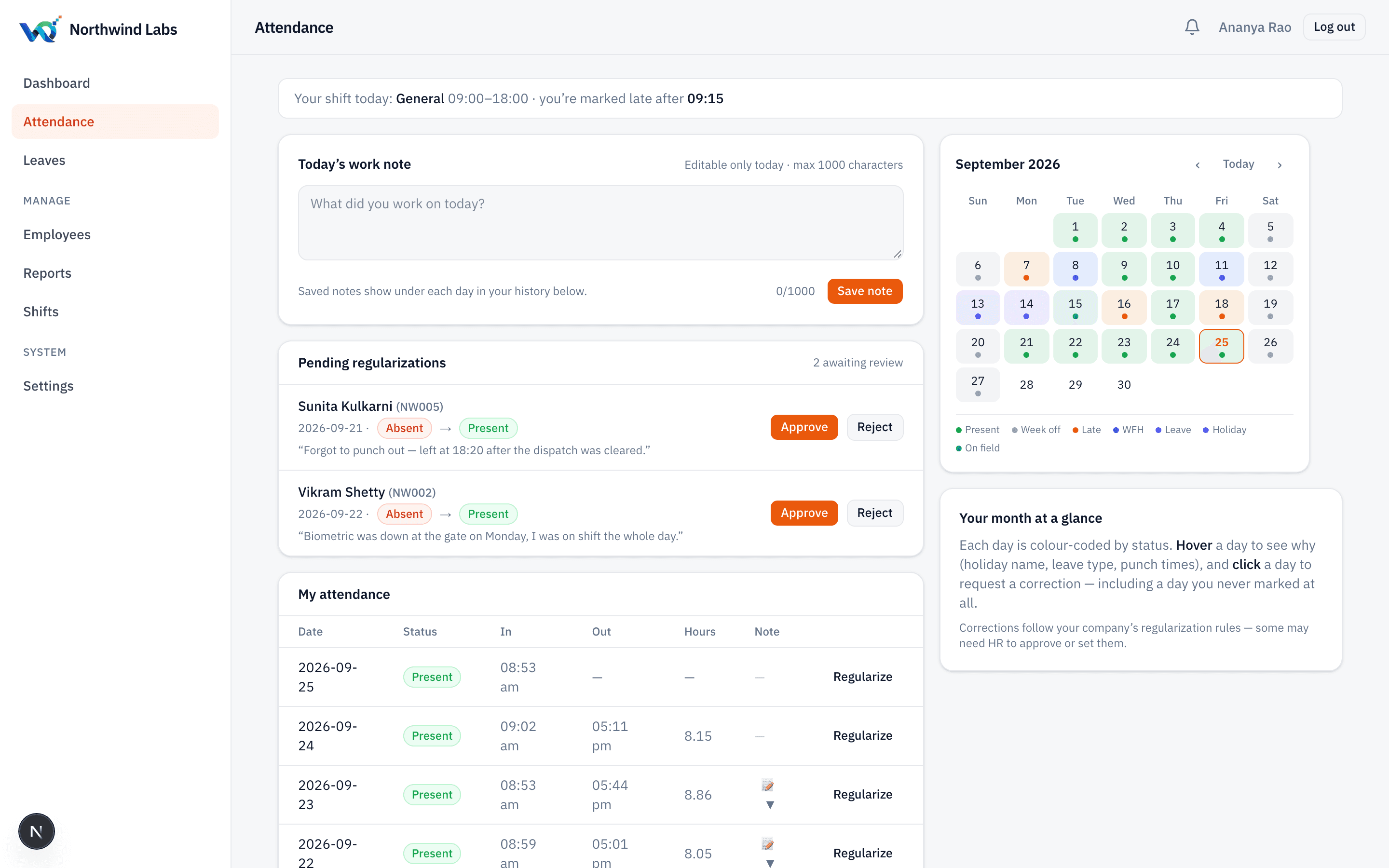
The employee raises a regularization; HR approves or refuses with a comment the employee sees verbatim. Caps, time windows and which statuses can be self-requested are all yours to set.
Marking on behalf
When the biometric dies or someone is on site all day, an admin marks it for them — with a reason, always required. Nobody can mark their own attendance this way.
Daily work notes
The employee writes what they worked on, editable the same day. For field and project teams this turns a punch record into something a manager can actually read.
A personal calendar
Each person gets a month view with holidays, approved leave, their own week-offs and any pending correction — so “why am I short a day?” answers itself.
Audited, every change
Manual entries, approvals and automated changes all land in one log: who did it, what it was, what it became, and why. Readable per record, not buried in a database.
The problem
The problem is never the punching. It is the exceptions.
Any tool can record a button press. What decides whether attendance software is worth having is what happens on the days that do not go to plan — the biometric that was down on the 14th, the night shift whose punch-out fell after midnight, the field engineer who was working but never near a machine, the person whose week-off is Wednesday because that is when the plant shuts.
Most systems handle these by letting someone overwrite a cell. That is how attendance data stops being evidence. Six weeks later, nobody can say whether a day was corrected, by whom, or on what grounds — and the first time an employee disputes a deduction, the record cannot defend itself.
AMS treats every exception as a recorded event. A correction is a request with an approver and a comment. An on-behalf entry demands a reason before it will save. An automated change names itself as automated. The result is a month that can be handed to payroll, and defended afterwards, line by line.
Every correction is somebody's decision, on the record
Set a monthly cap per employee, a window of how far back a correction may reach, which statuses staff may request themselves, and whether a document is required after a certain number of days. All of it enforced by the server, not by a policy document nobody reads.
Things this handles that spreadsheets do not
- A different weekly off for every person on the roster
- A night shift whose punch-out lands on the next calendar day
- An employee who joined on the 12th and owes only part of the month
- An employee who left on the 20th, still counted for the days they worked
- A biometric outage corrected in bulk, with the reason recorded once
- A holiday that is optional for some staff and not for others
- A correction that must not be allowed more than twice a month
- An auditor asking, in March, who changed the 14th of January and why
Questions
Frequently asked
Does AMS work with our biometric machine?
Not yet. Device integration is the most requested item on our roadmap and it is next in that queue. Today attendance is marked by the employee from a browser, or by an admin on their behalf with a reason recorded. If a device is essential to you, say so on a demo call — it affects where you sit in that queue.
Can employees clock in from their phone?
Yes, from the phone's browser — AMS is responsive and works on a phone today. A dedicated mobile app is on the roadmap rather than shipped, and we would rather say that than call a web page an app.
Can we stop people clocking in from outside the office?
Not in the current release. The GPS and geofence columns are already in the database, so switching it on is a release rather than a rebuild — but it is not live, and we will not list it as though it were.
What happens if somebody simply never marks attendance?
You choose. The policy can do nothing, warn the employee and their manager after N working days, or block their next clock-in until the gap is resolved. It can also auto-mark absent after a number of unmarked working days so your reports do not end the month full of blanks.
Can a manager mark attendance for their whole team?
An admin or HR user can mark on behalf, one person or in bulk for a biometric outage, with a reason. A supervisor role scoped to just their own crew — for labour workforces where workers have no device at all — is designed but not yet built.
Is attendance editable after the month closes?
It is editable by whoever holds the permission, and every edit is logged with its before and after values. We deliberately do not hard-lock a month, because real corrections arrive late; we make sure a late correction is never invisible.
Next step
See it on your own roster
A working demo takes about twenty minutes, and we will use your shifts and your week-offs rather than a sample company.