
Leave
A leave management system whose balances actually reconcile
Your leave types, your rules, your holiday calendar. Working days counted from each employee's own shift, and a balance that moves exactly once, no matter how many times somebody clicks.

What you get
Everything this module does
Leave types you define
Name, colour, days per year, half-day allowed or not, carry-forward with a cap, negative balances permitted or not, document required or not. Casual, sick and earned are seeded on day one; the rest is yours.
Monthly accrual or an annual grant
Per leave type, and it is a setting rather than something built into the product: 1.5 a month, 0.5, or the whole year granted at once. Credited on the 1st and capped by the type's days a year, and nobody is credited for months that have not happened, so a balance read in March shows three months' worth, not twelve.
Probation, per person
A company default sets the length, and each employee carries their own date, so a senior hire can be given none. Whether leave builds up during probation is a per-type setting, because companies genuinely differ. Changing the company figure never re-dates anybody already hired.
Pro-rated for joiners
Somebody who starts in December is not handed a full year's quota. The entitlement is derived rather than stored, so it stays right when you change a policy instead of leaving old balances stranded at whatever the previous rule reached.
A ledger, not a running total
Every accrual, carry-over and hand correction is a dated line with a reason, not a number that quietly changed. “Why is my balance 4.5?” has an answer, and nothing is deleted when a setting changes, so the explanation for days already taken survives.
HR can correct a balance
By hand, with a reason that is required rather than optional, shown beside the history that explains how the number got there. A correction is a ledger line like any other, and it never silently overwrites the arithmetic.
Working days, computed
Apply for the 12th to the 18th and the server works out what that costs, skipping weekends according to that employee's own shift, and skipping your company's holidays.
Apply, approve, reject, cancel
Balance is deducted on approval and returned on cancellation. Either party can cancel and the other is notified. Rejections carry the approver's comment, shown to the employee verbatim.
Balances that cannot double-spend
Balance rows are locked on apply and on approve. Two approvers acting at the same second, or one impatient double-click, cannot spend the same day twice.
Half-days
Where the leave type allows it, and counted as half in every report and in the export, not rounded up to keep the arithmetic simple.
Apply on behalf
HR files and approves in one step for staff who phoned in, with that employee's own remaining balance shown inline before it is submitted.
A day count before you submit
“you picked 4 calendar days, and 2 days will be deducted”, naming each weekend day and holiday that came off. It is computed by the same code that charges the balance, so the preview cannot disagree with what lands. The figure offered is what is actually spendable: remaining, minus days already applied for and not yet decided.
Who's away, next 30 days
Off today, coming up, and the busiest single day. It is the screen an approver needs before saying yes, rather than after. It answers “can I let this one go?” without opening anybody's calendar.
Leave history you can question
Filter by type, by person, and by a date range that catches any leave overlapping it, including one that started before your range or ends after it, which is exactly the leave a naive filter loses.
Holiday calendar, including retroactive ones
Per company, with optional holidays marked optional, and bulk import so a year goes in at once. Declare a holiday after the fact and it shortens leave already booked across it, and tells you how many requests it just changed, rather than adjusting them silently.
Retire, don't delete
A leave type you have stopped offering is retired rather than deleted, so last year's approved leave still makes sense when you look at it next year.
A guarded cancellation
An approver cannot approve their own leave, let it run, and then refund themselves the balance afterwards. The system refuses.
The problem
Leave goes wrong quietly, and then all at once in March.
Leave tracking usually starts as a shared spreadsheet, and for a while it works. It breaks at the edges: a sandwich weekend that someone counted and someone else did not, a public holiday inside a five-day leave, an employee on a six-day week whose Saturday is a working day when everyone assumed it was not, a half-day rounded up because the column only took whole numbers.
None of these are noticed when they happen. They are noticed at the end of the leave year, when balances are reconciled and four people are each short a day and a half, and nobody can reconstruct which of the eleven months the error came from.
AMS removes the arithmetic from the humans. The server computes the working days for a request from that employee's own shift and your holiday list, deducts on approval, restores on cancellation, and keeps the whole movement traceable. The balance on screen is derived, never a number somebody typed.
All of it is a setting, not a quote for custom work
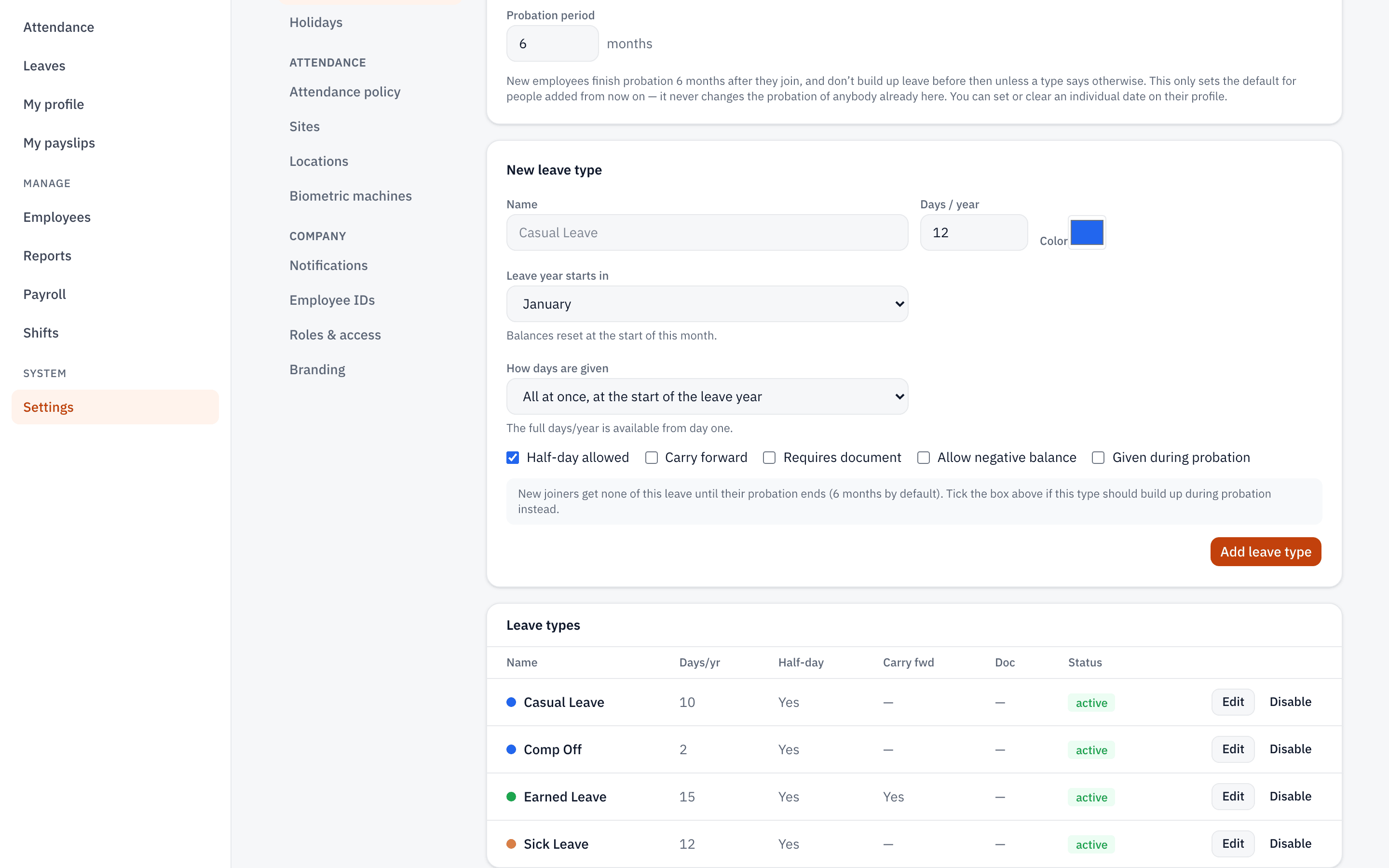
Probation length, whether each type accrues monthly or is granted once a year, the rate, the carry-forward cap, half-days, negative balances and whether a document is needed. You change them in Settings rather than asking me to, and switching a type back from accrual to an annual grant restores the grant properly instead of leaving balances stuck at whatever accrual had reached.
Rules AMS enforces so you do not have to police them
- Weekends skipped according to that employee's shift, not a company default
- Company holidays excluded from the days counted
- Carry-forward capped at whatever number you set
- Negative balances allowed only where you permit them
- Documents demanded by the leave types that require them
- The leave year starting in the month your policy starts in
- An approver blocked from refunding their own taken leave
- Retired leave types kept readable in historical records
- Days already applied for and not yet decided held back from the balance offered
- Accrual credited only for months that have actually happened
- A joiner's first year pro-rated rather than granted in full
Questions
Frequently asked
Can we define our own leave types?
Yes, entirely. Name, colour, days per year, half-day, carry-forward and its cap, negative balance, and whether a document is required. New companies start with Casual, Sick and Earned seeded so the module works on day one, and you change those or replace them.
Does it handle multi-level approvals?
Not yet. Today approval is single-level: the request goes to the approvers who hold the permission. Multi-level chains with timeouts and auto-escalation are designed but deliberately not shipped, because a half-built escalation that silently drops a request is worse than none.
Does leave accrue monthly, or is it granted once a year?
Either, because it is a per-type setting and you change it in Settings rather than asking me to. Monthly accrual credits on the 1st at whatever rate you set and is capped by the type's annual figure; an annual grant hands the year over at once. Switching a type back from accrual to a grant restores the grant properly instead of leaving balances stuck at whatever accrual had reached. Underneath both is a ledger, so every movement is a line somebody can read.
What happens to a holiday that falls inside somebody's leave?
It is not counted against their balance. The server excludes holidays and that employee's own week-offs when it works out what the request costs.
Can HR apply for leave on an employee's behalf?
Yes. HR files and approves in one step, which is what actually happens when somebody phones in sick. The employee's remaining balance is shown inline before it is submitted, and the record shows HR filed it.
Do approvals send an email?
Notifications are in-app today, a bell with an unread count, and email for leave events is on the roadmap. Invites and password resets do go out by email. I list the two separately because conflating them would misrepresent what a manager will actually receive.
Keep reading
Next step
See it on your own roster
A working demo takes about twenty minutes, and I will use your shifts and your week-offs rather than a sample company.