
Reports & export
The muster roll, and the file payroll actually runs from
The whole month as a grid — one row per person, one cell per day, each person's own week-offs shaded correctly. Exported to Excel with real dates and real times, not text that looks like a date until you sort it.

What you get
Everything this module does
Muster roll
The month as a grid. Every person a row, every day a cell, week-offs shaded per employee rather than on a company-wide assumption about Sundays.
Monthly summary
Per person: present, late, absent, WFH, on field, leave, not marked, days due, hours worked, overtime and the attendance rate.
Attendance register
Every day in a date range with punch-in and punch-out times, hours and the employee's own work note. Paged, so a year does not take a minute to open.
Analytics
Absenteeism, overtime and late arrivals per employee — the three reports that start most difficult conversations, ready before the conversation.
Excel export
On the summary, register, muster and analytics. Real Excel dates and times, so sorting and formulas work on the file rather than against it.
An attendance rate that holds up
Days at work divided by days due at work — that person's shift working days, minus holidays, minus approved leave. A Sunday worked does not cover a Tuesday missed.
Joiners and leavers, counted properly
Somebody who joined on the 12th appears for the part of the month they worked, not as a person with twenty absences. Leavers the same.
Nobody silently dropped
People who had not joined yet are named and explained rather than quietly removed from the report. Someone who owed no days reports “—”, not 0%.
Filters that match the question
Date range and department, with validation on both the client and the server so an impossible range fails clearly rather than returning a confusing empty page.
The problem
An attendance rate is an opinion until you say what it divides by.
Most systems compute attendance as days present divided by days in the month. It produces a clean-looking percentage that is wrong for everybody who does not work a Monday-to-Friday month with no leave. Anyone on a six-day week looks better than they are. Anyone who took approved leave looks worse. A person who joined on the 20th looks catastrophic.
The number matters because people are judged by it and, eventually, paid by it. So AMS defines it explicitly: days at work, divided by days due at work — where days due is that employee's own shift working days, minus company holidays, minus their approved leave. Approved leave does not count against you. A Sunday worked does not make up for a Tuesday missed, because they were never the same obligation.
The same discipline runs through the export. One row per person per day, real Excel dates, hours as numbers — because the file's job is to be opened by whoever runs your payroll and used without being cleaned first. That export was built before payroll deliberately: it is what lets a company adopt AMS without changing how they pay people.
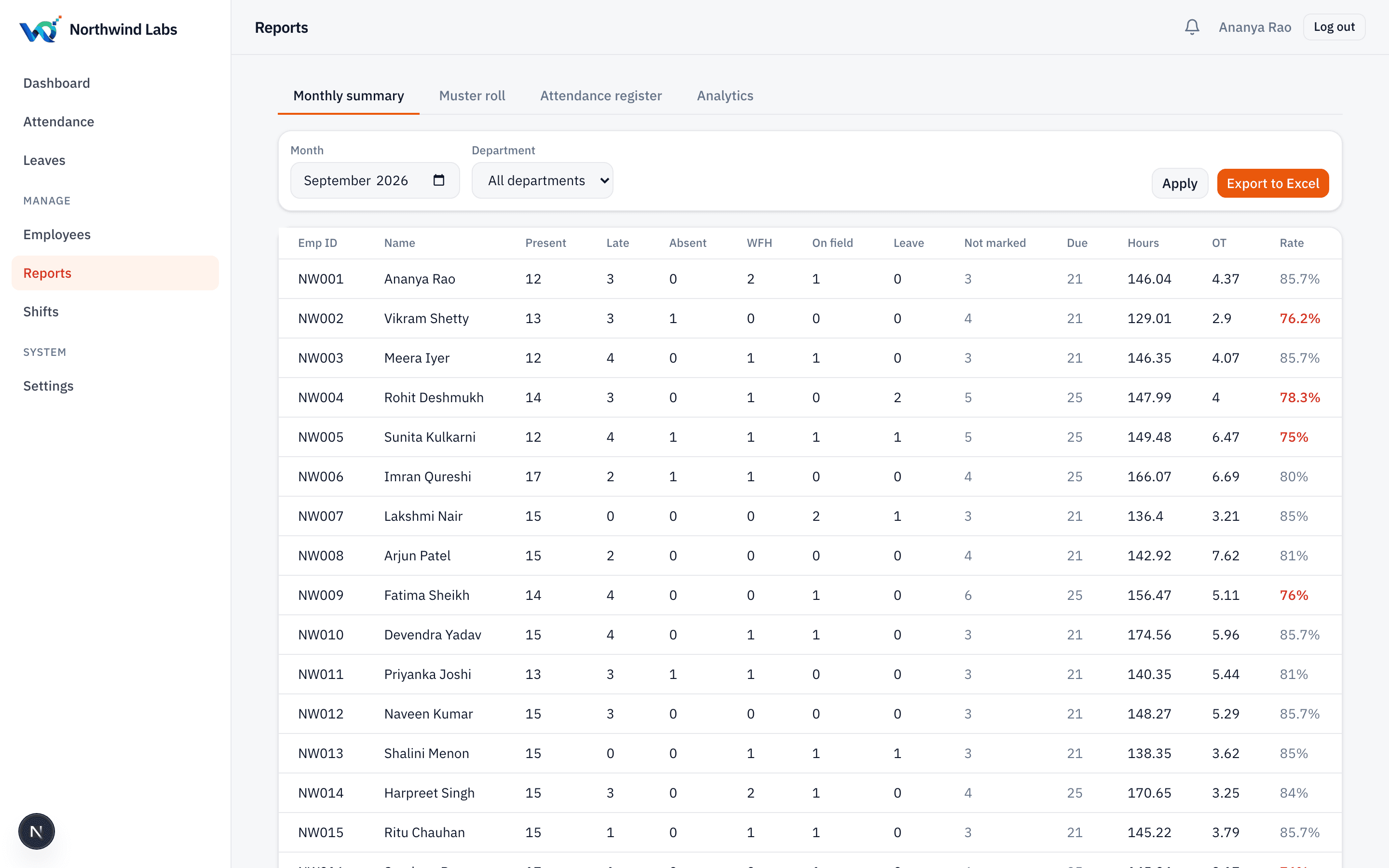
Built to be exported, not just to be looked at
Every report on this page has an Excel export beside it, scope-aware so a department head exports their department and an admin exports the company. The file is the deliverable — the screen is just where you check it before sending.
What is in the month-end export
- One row per person per day — never two, whatever happened that day
- Punch-in and punch-out as real Excel times
- Hours worked and overtime hours as numbers, not text
- Status per day: present, late, absent, WFH, on field, leave, not marked
- Each employee's own week-offs and your company holidays reflected
- Approved leave excluded from days due, not counted as absence
- Joiners and leavers scoped to the days they actually worked
- The employee's daily work note, where they wrote one
Questions
Frequently asked
Can we export to Excel?
Yes — the monthly summary, attendance register, muster roll and the analytics reports all export to .xlsx, with real dates and times rather than strings. This is the file most clients hand straight to whoever runs their payroll.
Is there a PDF export?
Not yet. Excel came first because it is what payroll actually consumes; PDF is on the roadmap. We would rather ship one format that is correct than two that are approximately right.
How is the attendance rate calculated?
Days at work divided by days due at work. Days due is that employee's shift working days for the period, minus company holidays, minus their approved leave. Someone who owed no days in the period shows a dash rather than zero per cent.
Can a department head see only their own department?
Yes. Every report is scope-aware — own, team, department or company — and the scope is enforced on the server, on the export as well as the screen.
Do reports get slow with a few thousand employees?
Reports are computed live today, which is comfortable at the scale we serve. Pre-aggregated nightly statistics for large tenants are designed and not yet switched on; we will turn them on before you need them rather than after.
Can reports be emailed on a schedule?
Not yet. Scheduled report emails are on the roadmap. Today someone opens the page and exports, which for a monthly cycle is a two-minute job.
Keep reading
Next step
See it on your own roster
A working demo takes about twenty minutes, and we will use your shifts and your week-offs rather than a sample company.