
Versnq AMS
LiveAMS, an attendance management system that holds up at month end
A multi-tenant attendance platform for Indian companies. Your own address, your own rules, your own roster, and a month-end export your existing payroll runs from without being re-typed.
A month in AMS
Scroll through a month, from the first punch to the payroll file
The demo company, moving as you scroll. Every screen shows something AMS does today.
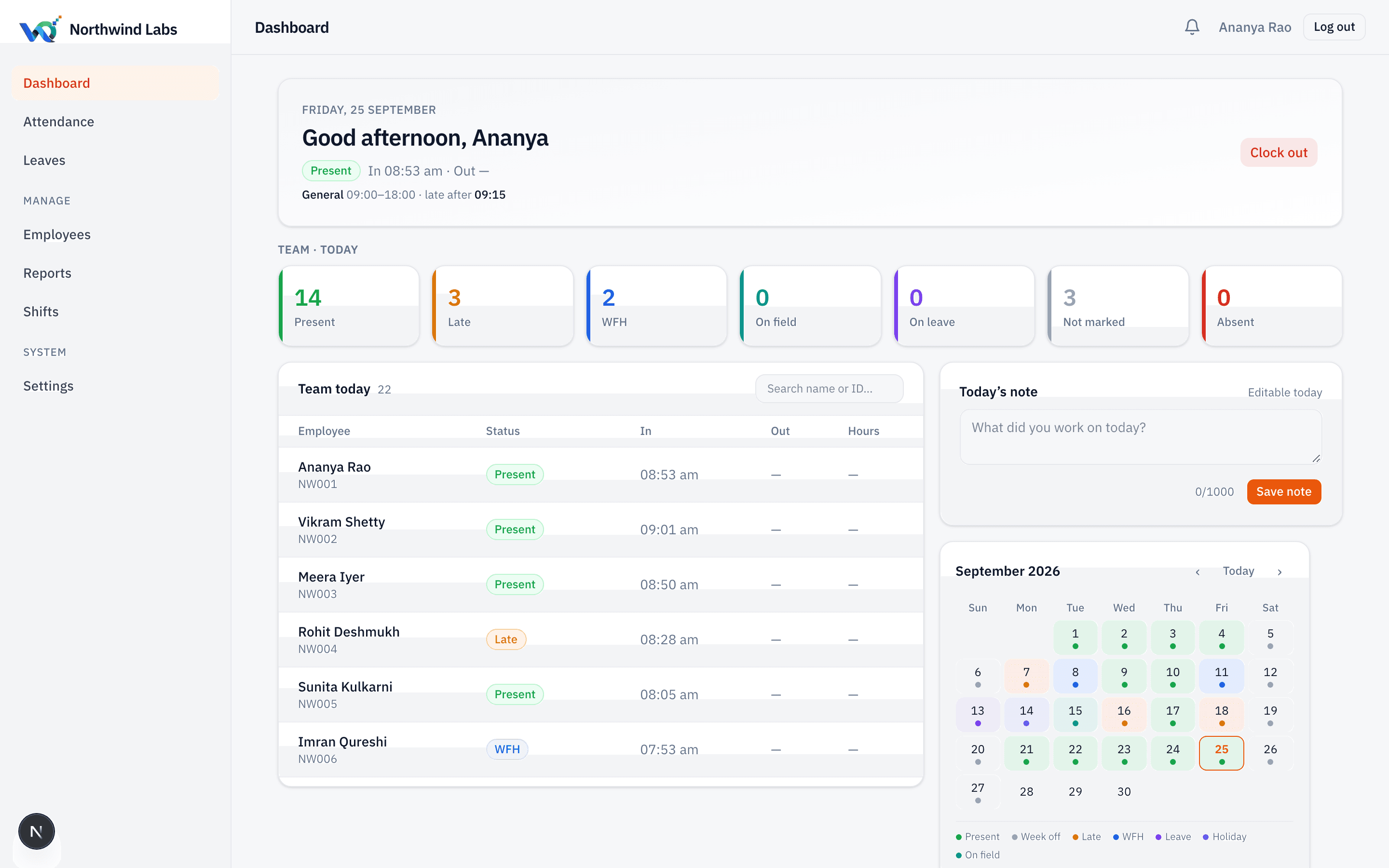
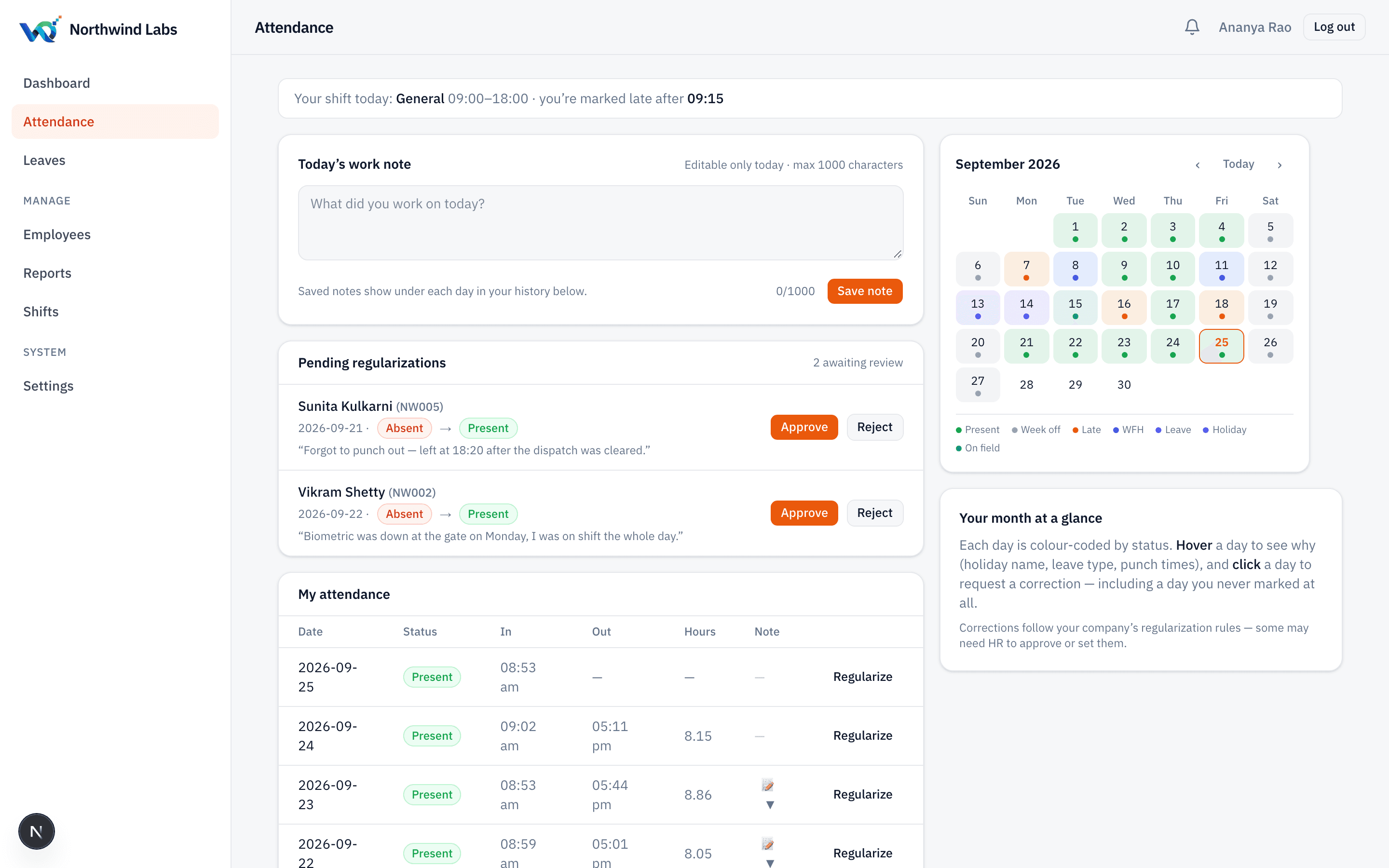
019:02 am: Priya clocks in
One button. The punch time lands on her card, against her own shift. Had she been past the late cut-off, the card would have said so before she punched.
- Late cut-off warned before the punch
- Hours written at clock-out, never guessed
02HR sees the day as it happens
Who is at work, who is late, who is working from home or on field. Somebody with no punch yet is Not marked, never quietly counted absent.
- Not marked is not Absent
- Per site and per department
03A supervisor marks the site crew
Workers on a site often have no email and no phone. Their supervisor ticks the crew in one go, with one reason for the whole batch.
- Workers need no login, and take no seat
- The old mark stays in their history
04A missed punch, fixed with a reason
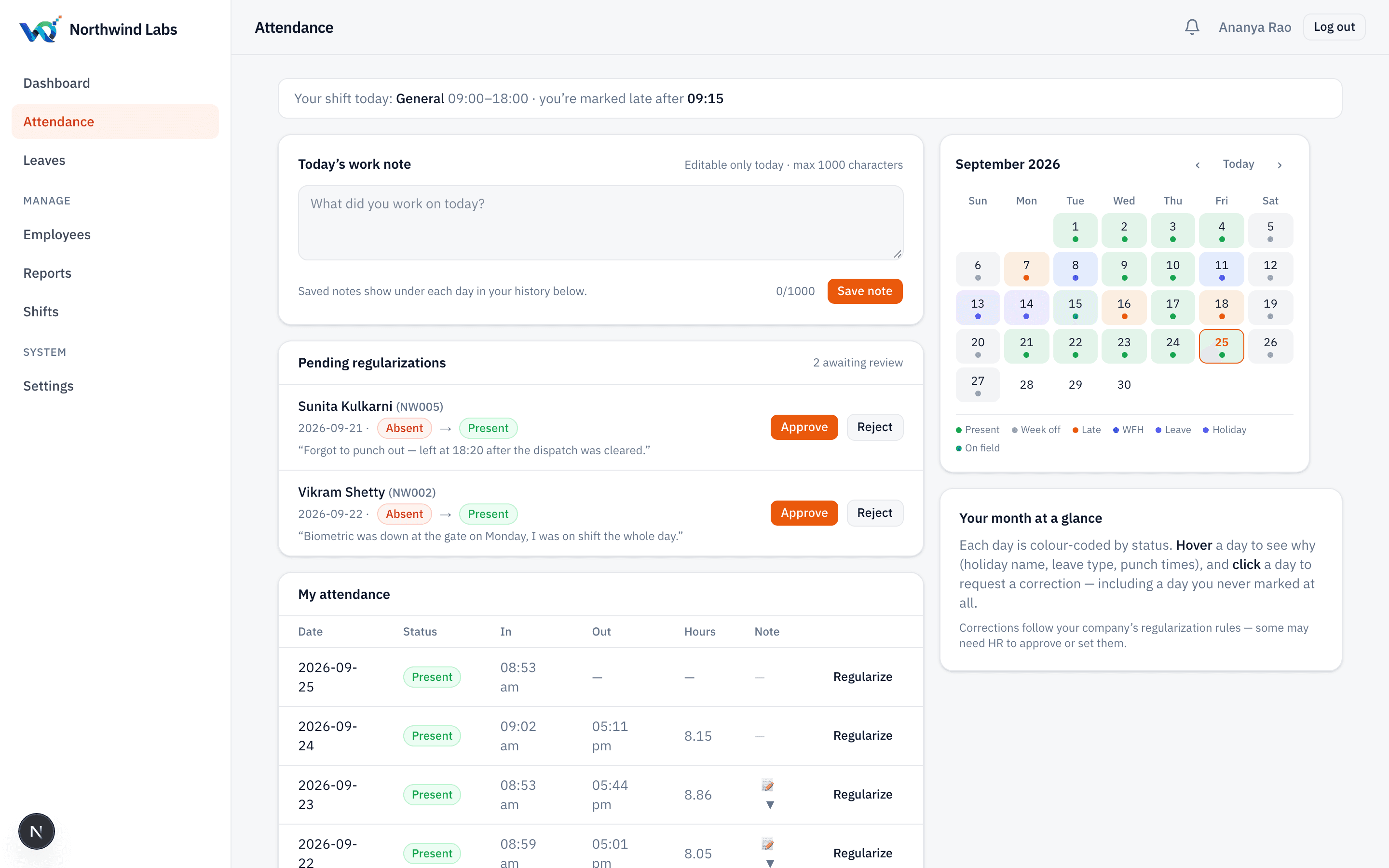
Sunita forgot to clock in. She asks for a correction with both times and a reason. HR approves with a note, and she reads that note back word for word.
- Who asked, and why, kept on the record
- Correction window and monthly cap, per company
05Leave, requested and approved
Ramesh asks for two days. His manager approves in one tap and his balance updates on the spot, from the same calendar the muster reads.
- Accrual and probation rules
- Entitled, used and remaining, per type
06Month end: the muster roll, then Excel
The whole month as one grid, week-offs shaded per person, every row adding up to the days in the month. One click gives the Excel file your payroll runs from.
- Late, WFH and on field all count as P
- Real Excel dates, not text
My attendance
Attendance · Team
Attendance · Mark crew
Approvals · Corrections
Approvals · Leave
Reports · Muster roll
Muster roll · November 2026
P present · WO week-off · L leave
muster-november-2026.xlsx
Real Excel dates. The file your payroll runs from.
The short answer
What an employee management system actually has to do
It has to hold your people records and the daily facts attached to them: who works here, which department and shift they are on, who was at work today, who is on leave. Then it has to add that up at the end of the month into something payroll can use without being re-typed.
Most online employee management systems do this well for an office and badly for everybody else. AMS is built for a roster where some people sit at a desk with a work email, and others are on a site with no phone, no inbox, and a supervisor who marks them.
What it is not, yet: a full HCM suite. There is no performance module and no recruitment. Payroll is built (PF, ESI, PT, TDS, payslips, the bank upload file) and is being proven against a live client's month before I offer it to anyone else. Until then you run your existing payroll from the AMS Excel export, and I would rather say so here than let you find out in month two.
People & departments
Records, roles, reporting lines, sites
Employee attendance management
Clock in and out, or marked for them
Leave
Your own types, accrual, balances that reconcile
Shifts & roster management
Night shifts, rotations, per-person offs
Attendance register & muster roll
The month as a grid, exported to Excel
Access control
Four roles, four scopes, checked server-side
Why it is different
The four things most attendance software gets wrong
None of these are exotic. They are simply the parts that are tedious to build correctly, so they usually are not.
Ten people, ten days off
Weekly offs are set per employee. You do not create a shift called “General (Wed off)” just to say that Ramesh is off on Wednesday.
Night shifts that cross midnight
A shift ending before it starts is understood, not rejected. The 6am punch-out belongs to the night before, and the muster shows it there.
“Not marked” is not “absent”
One is a payroll decision, the other is a missing punch. Collapsing them is how people get docked a day they actually worked.
An attendance rate that survives scrutiny
Days at work ÷ days due at work: that person's shift, minus holidays, minus approved leave. A Sunday worked does not cover a Tuesday missed.
01
LiveAttendance
One button to clock in, and a day that is either accounted for or visibly not.
- Clock in and out: present, late, absent, work-from-home, on-field
- Work from home, on-field and late marking can each be switched off for a company that does not use them
- Late judged against that employee's own shift and grace period, in your company's own timezone
- A warning before the fact: “it is past 09:15, so clocking in now will be marked late”
- Night shifts work: a 22:00 start and an 05:30 finish is one day, dated the evening it began
- “Not marked” is kept distinct from “absent”, because they are different problems
- Mark on behalf, for one person or a whole group for one day, with one reason covering the batch
- Daily work notes, readable by HR on any day of anyone's calendar
- Every dashboard count is a filter: click “Not marked” to see exactly who
02
LiveShifts & roster management
Ten people, ten different days off, without inventing ten shifts to say so.
- As many shifts as you actually run: morning, evening, night, general
- Per-shift working days, so a six-day week and a Wednesday-off week coexist
- Per-employee weekly offs, set with seven day buttons and no new shift created
- Overnight shifts understood as crossing midnight, not as an error
- A shift schedule per employee with effective dates, so “late” stays correct for a moving roster
- Rotating rosters: starting a new assignment ends the open-ended one the day before
- Overlapping assignments refused, naming the one they clash with
- Per-employee grace periods: ten minutes on one shift, none on another
03
LiveLeave
Leave types you define, balances that move exactly once, and a ledger that explains every number.
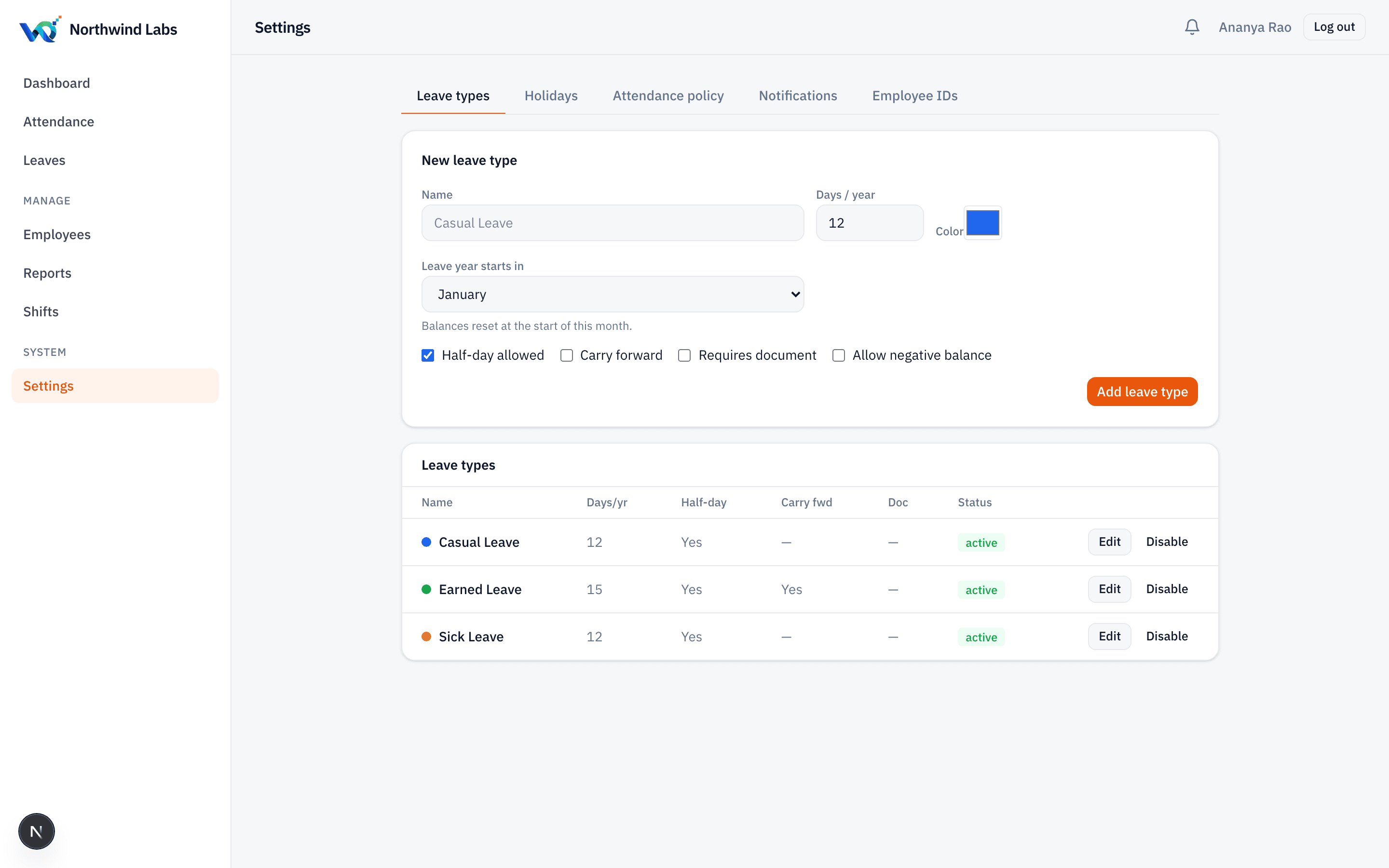
- Custom types: days per year, half-day, carry-forward with a cap, negative balance, document required
- Monthly accrual or an annual grant, per type: 1.5 a month, 0.5, whatever you run
- Probation: a company default plus a date on each person, and whether leave accrues during it
- Pro-rated for joiners, so somebody starting in December is not given a full year's quota
- A ledger, not a running total: every accrual, carry-over and hand correction is a dated line with a reason, not a number that quietly changed
- HR can correct a balance by hand, with a required reason, beside the history that explains the number
- A day-count preview before you apply: “you picked 4 calendar days, and 2 days will be deducted”
- “Who's away” for the next 30 days, and leave history filtered by type, person and overlapping date range
- Declare a holiday retroactively and it shortens leave already booked across it, and tells you how many requests it changed

04
LiveCorrections & audit
Someone forgets to punch every single week. The fix is a request, not an argument.
- Employee raises a correction; HR approves or refuses with a comment shown back verbatim
- Or the company lets corrections apply without review, and each one is still recorded with who asked and why
- “My correction requests” shows the employee what happened to theirs, including the reviewer's note
- One Approvals inbox for pending leave, corrections and overtime, decided in place
- Admin can mark on behalf when biometrics fail, and a reason is required, always
- Nobody can mark their own attendance through the on-behalf route
- The server refuses attendance for a day that has not happened yet
- Every change is logged and readable on the record itself: who marked it, when, what it was before, and why
05
LiveReports, attendance register & export
The month, as a grid your existing payroll can run from without being re-typed.
- Attendance register: every day in a range with punch times, hours and the employee's own work note
- Muster roll: the whole month as a grid, one row per person, per-employee week-offs shaded correctly
- Monthly summary: present, late, absent, WFH, on field, leave, not marked, hours, overtime
- Absenteeism, late arrivals and overtime, each with a total
- A leave report by person and type: entitled, carried forward, used, pending, remaining
- Attendance rate = days at work ÷ days actually owed, never counting days that have not happened yet
- Drill down from a summary row into that person's month, to see which days were missed and why
- Sort by any column, search within a table, and a totals row that follows the search box
- Excel export on all seven reports, with real dates and times, not strings

06
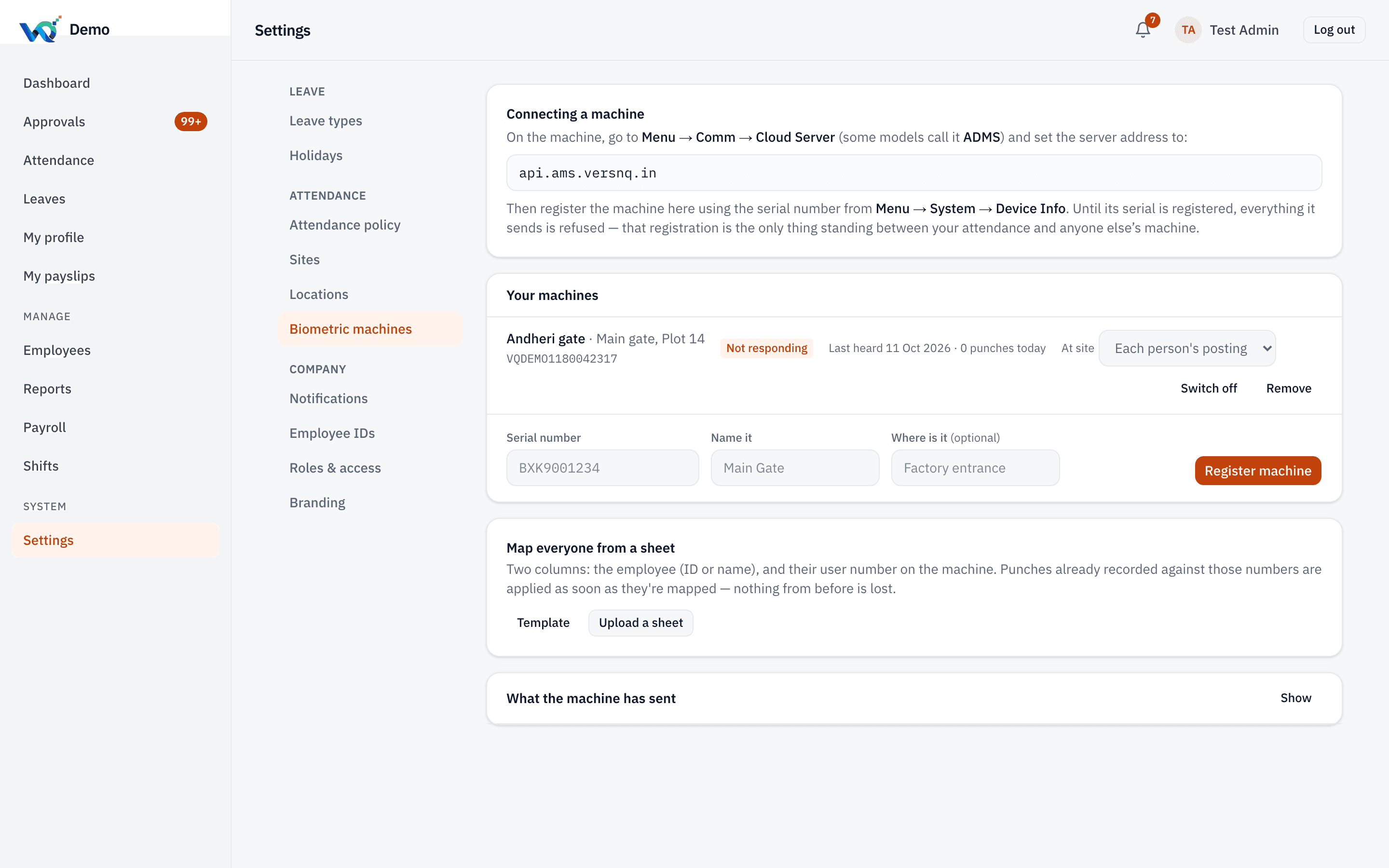
LiveBiometric machines
An eSSL machine on a client's wall is posting its punches to AMS. Running in production, not simulated.
- The machine posts punches to AMS as they happen, over the eSSL/ZKTeco push protocol
- Register it by the serial on its own screen; until you do, nothing it sends is accepted
- Punches are kept as evidence and attendance is re-derived from them, so they can arrive in any order
- It never overwrites a day HR marked by hand, a day fixed by a correction, or a day the employee marked themselves, and the log says which, in words
- A single punch stays a single punch: somebody who forgot to punch out leaves the day open rather than getting an invented finish time in the column payroll reads
- Map a machine's user numbers to employees after the fact and the days already recorded are applied retroactively
- Import a machine's own log export
07
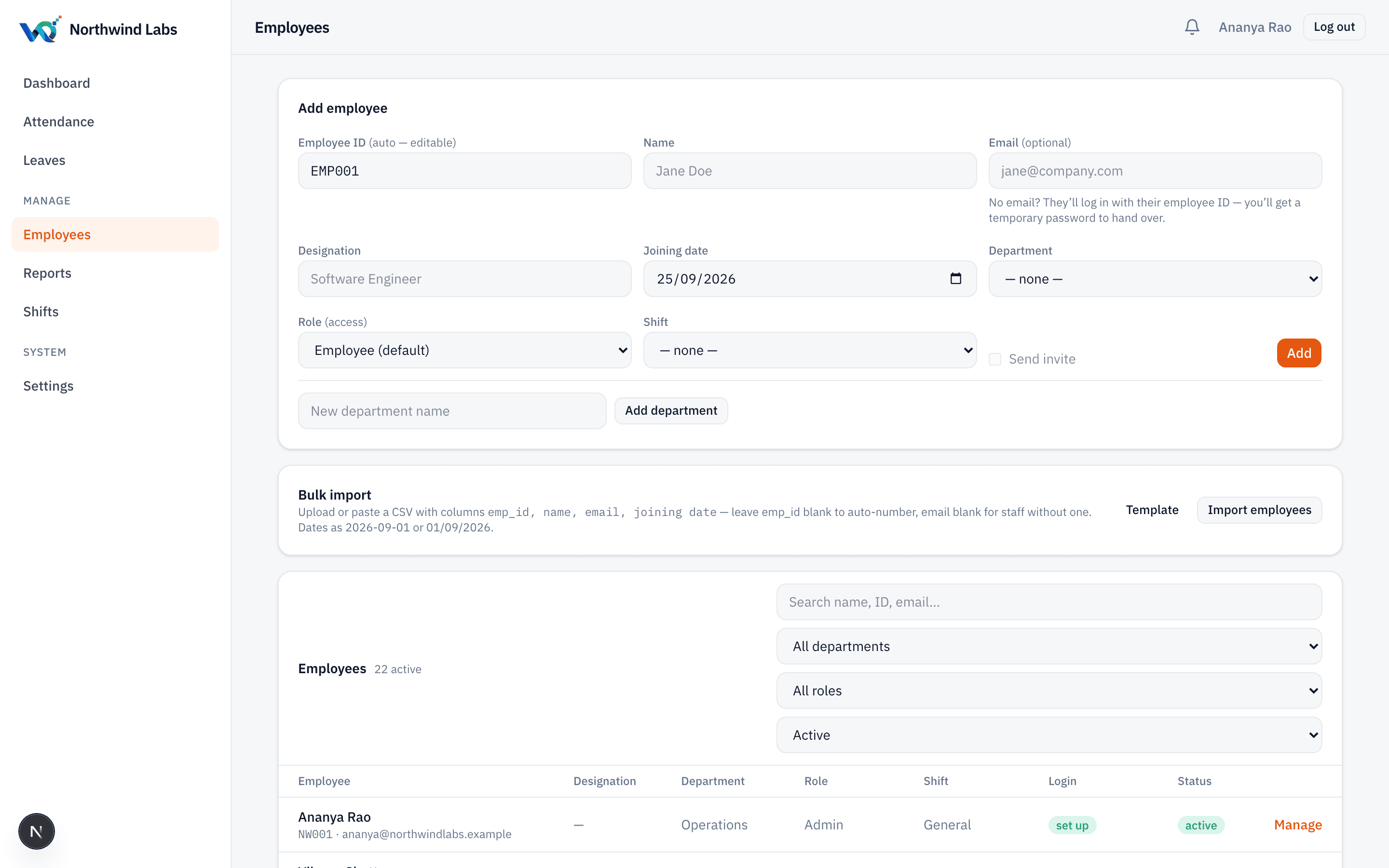
LivePeople & access
Staff without an email address are first-class here, because on a real shop floor most of them are.
- Sign in by employee ID or email, because email is optional
- Workers a supervisor marks need no login at all, and are not a seat you pay for
- Owners and directors can be in the system without appearing on the attendance register
- Auto-numbered employee IDs in your own format: prefix and digit count, KC001, KC002…
- Import a CSV file with a dry-run preview: rows ready, lines that will be skipped and why, and columns being ignored
- The import sets the real fields: department, role, shift, supervisor and site, matched by name
- A template pre-filled with your own departments and shifts
- Search and filter by department, role, shift and status, then export that filtered roster to Excel
- A change history per employee: who changed what about them, and when
- Soft delete on exit: nothing destroyed, history survives, rehiring works
- Four roles, and four scopes (own, team, department, company) re-checked on every endpoint
08
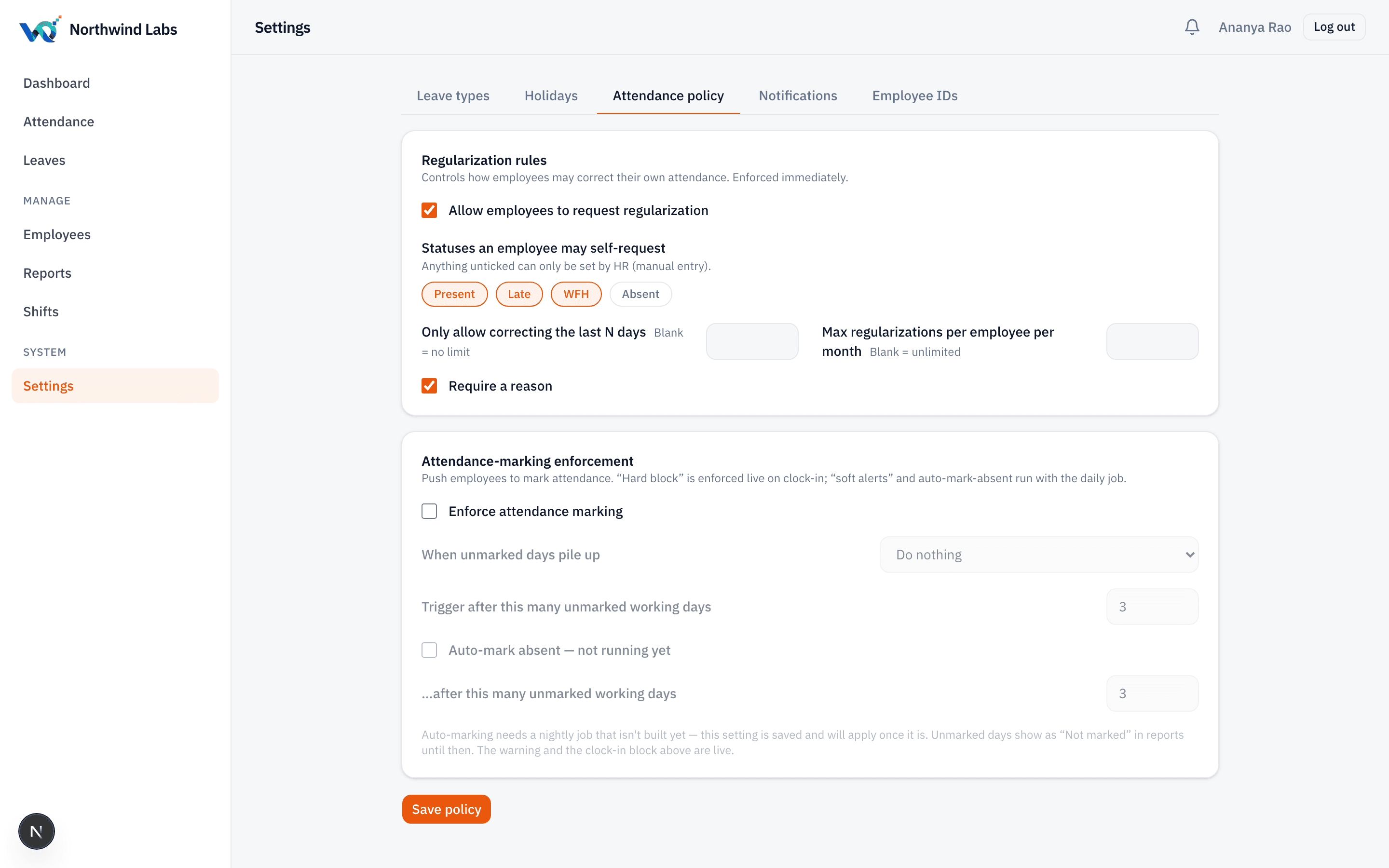
LiveAttendance policy
Your rules, enforced by the server rather than by reminders on WhatsApp.
- Detect unmarked attendance after N working days
- Then do nothing, warn the employee on their own dashboard, or block their next clock-in
- An unmarked day stays “Not marked”, and is never turned into an absence behind anyone's back
- “Count these as absent” is an option on the export: it changes the file, never the record
- Corrections: master switch, monthly cap per employee, how far back, which statuses, and whether a correction needs approval at all
- Whether a work note is compulsory at clock-out is yours: do not ask, ask and allow a skip, or refuse without one
09
LiveSupervisors, sites & labour
For the half of a workforce that carries no device: a supervisor marks the crew, and the site board adds up.
- A Supervisor role that sees only its own crew: their attendance, leave and profiles, and nothing else
- Deliberately no leave approval: marking a day absent and refusing the leave that would cover it is too much for one person to hold
- Mark twenty people at once, for workers who have no login of their own and take no seat
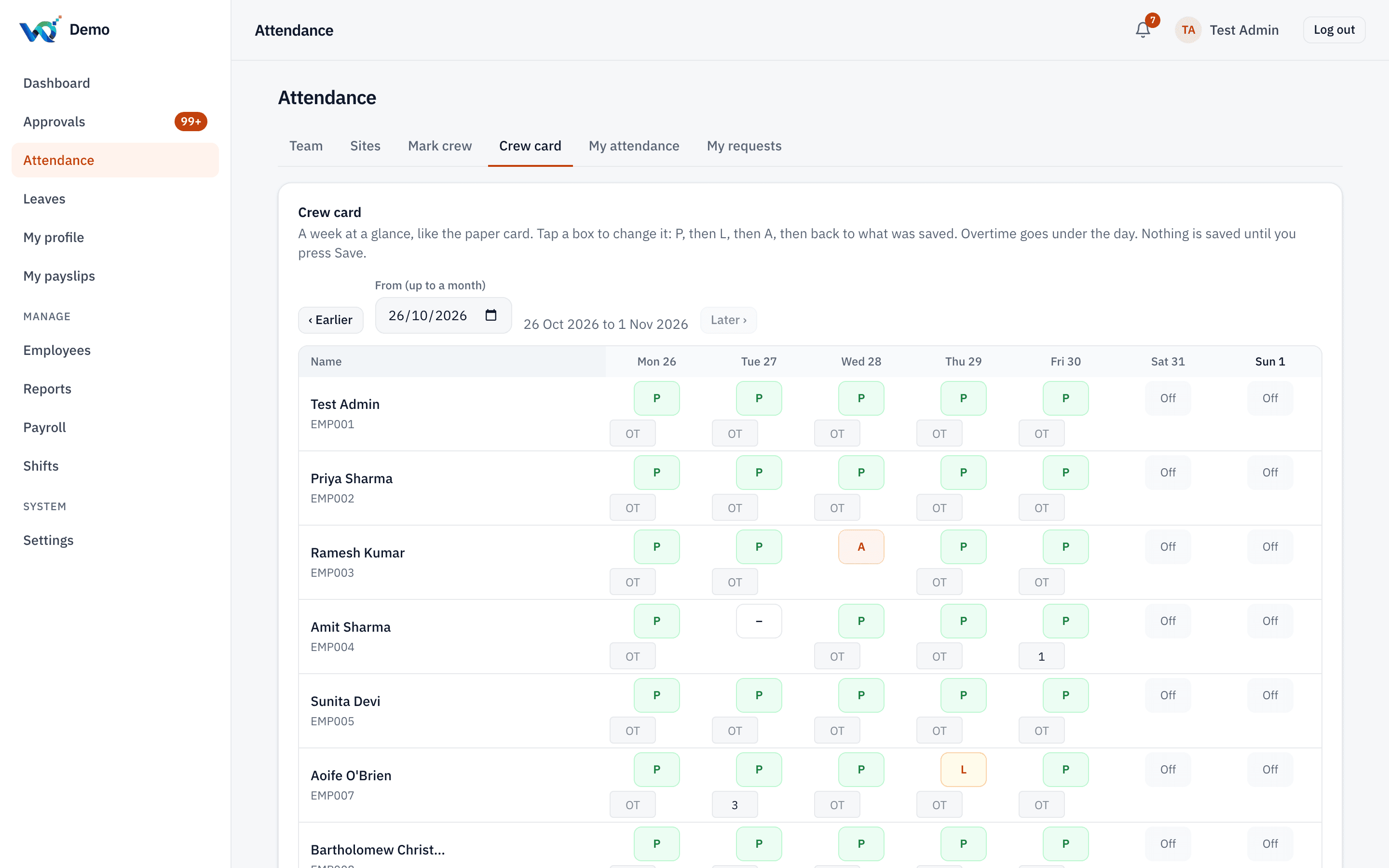
- The crew card: a crew's whole week on one screen, like the paper card, with a status and overtime in each box
- A supervisor can change a day they marked by hand later, and the old mark stays in that day's history
- Overtime entered for a whole crew at once. It is a claim, and only overtime somebody approves is counted
- How far back a supervisor may reach is yours to set: today only, today and yesterday, or no limit
- Sites: name the places you work. A project site, a plant, a branch. Just a name, with no GPS survey needed
- A site board: who runs it, how many are posted there, and how many are at work, on leave, absent or off
- Lend a crew to another site and it shows as working there while still posted here, and the board says “3 visiting”
- People posted nowhere get their own row, so “60 workers but the sites add up to 48” is always answerable
10
LiveGeofencing
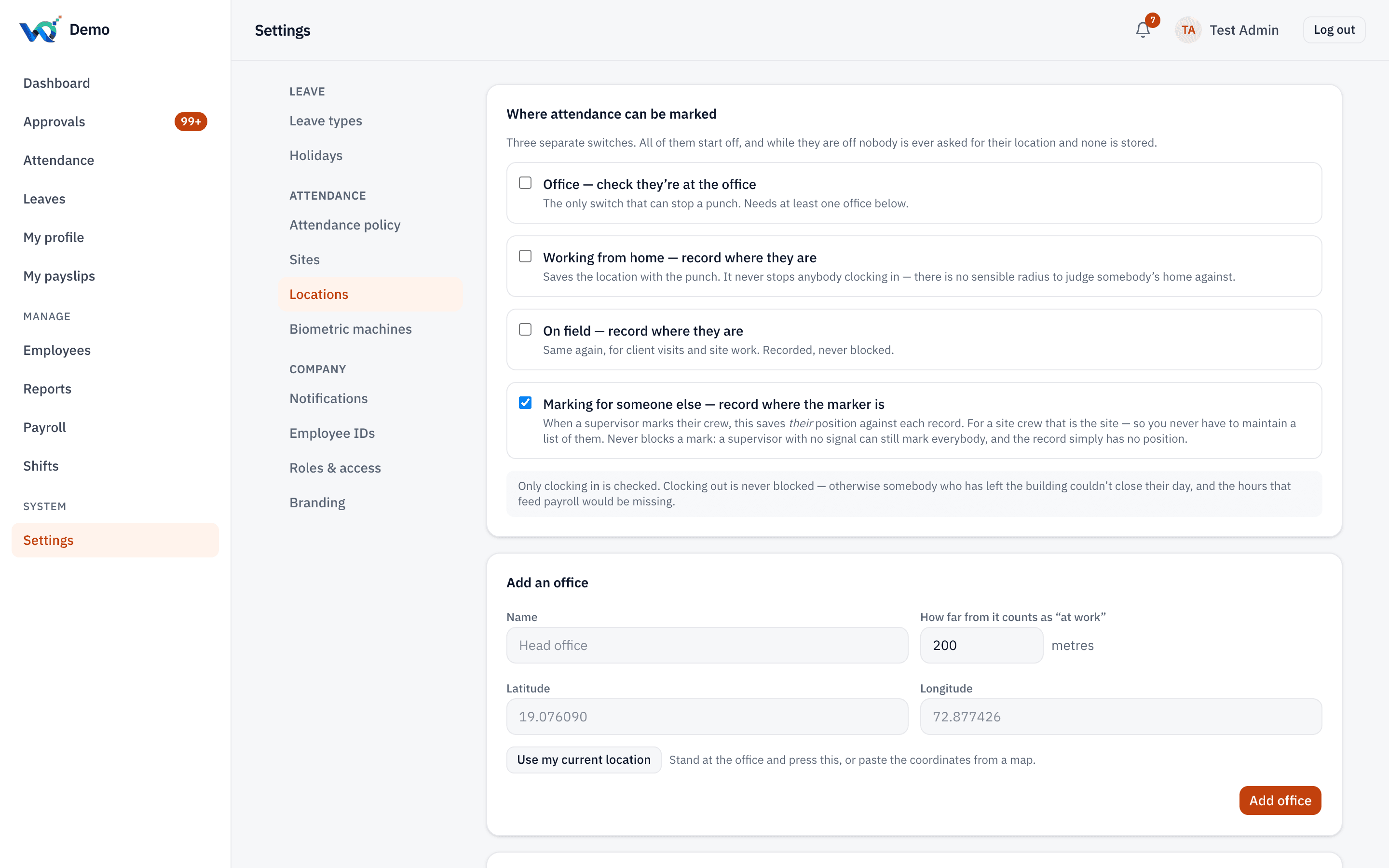
Optional, off by default, and switched on separately for the office, work from home and on field.
- Three independent switches: office, work from home, on field
- The office fence judges distance, and you choose whether it blocks or merely flags
- Home and field have no radius, because there is no honest one to judge somebody's home against. With their switch on, a punch must carry a location, and one without it is refused
- A phone's own stated GPS error is forgiven up to a cap you set: indoors a phone is routinely 50–200 m out, and a strict check refuses people sitting at their own desk
- Clocking out is never fenced, because somebody who has left the building must still be able to close their day
- Optionally record the supervisor's own position when they mark a crew; no signal simply means no position
For the people with no device
LiveHalf your workforce will never open the app. They still have to be counted.
Site crews, plant labour, housekeeping, loaders, security. No work email, no company phone, often no smartphone they would want to install anything on. Every HR platform asks for an email address in the first required field and then quietly fails these people.
In AMS their supervisor marks them, twenty at once, with one reason covering the batch, and that supervisor sees nothing but their own crew. Not the company roster, not the reports, not the settings. The workers themselves need no login at all, and a person who never signs in is not a seat you pay for.
They also cannot approve leave, and that is deliberate: somebody who can mark a day absent and refuse the leave that would have covered it is holding a person's pay on their own.
A site is just a name
Name the places you work: a project site, a plant, a branch. No GPS survey, no coordinates, because most sites are never surveyed and demanding a lat/long is how a company ends up listing none of them.
The site board adds up
Per site: who runs it, how many are posted there, and how many are at work, on leave, absent, not marked or on a weekly off.
Lend a crew and it still reconciles
Send four people to another site for the day and they show as working there while still posted here. The board says “3 visiting” rather than losing them.
Nobody falls down a gap
People posted to no site get their own row, so “we have 60 workers and the sites add up to 48” is a question with an answer.
The crew card, on one screen
The paper card supervisors send on WhatsApp, done properly: workers down the side, the days of the week across, a status and overtime in every box. A whole week saved in one go.
A mark can be changed, never lost
A supervisor can correct a day they marked by hand, and the old mark stays in that day's history with who changed it and when. Overtime can be entered for the whole crew at once.
How far back is your decision
A supervisor can be limited to today, to today and yesterday, or not limited at all. HR and admins are never limited, because correcting an old month is their job, and their audit trail.
On payroll
Payroll is built, and proven before it is offered
It is the question every buyer asks, so here is the answer before you have to.
Payroll in AMS is built: pay groups, PF, ESI, PT, LWF and TDS, payslips as PDF and by email, the bank upload file, and full and final settlement. It is being proven against a live client's real month before I offer it to anyone else, because payroll is the one place where a bug is somebody's salary, found on payday.
Until then you run your existing payroll from the AMS Excel export: real dates, real times, one row per person per day. Overtime is a claim that somebody approves, and only approved overtime is counted.
Under it
Built to be someone's system of record
Attendance data decides pay. It has to be correct, attributable and impossible for one company to read out of another.
Tenant isolation
Every request carries its company on the token, and every query is filtered by it server-side. Keys are UUIDs, so your size cannot be read off a URL.
Permissions, re-checked
Every route is either signed-in and gated on an atomic permission code, or deliberately public and listed with a stated reason, and an automated test checks that. Scopes are own, team, department and company. A hidden button is never the control.
Auditable by design
Manual entries and approvals land in one log, readable on the record itself: who marked it, when, what it was before, and the reason they gave.
One working calendar
Attendance, muster, leave day-counting and the absence counter all read the same source. They cannot drift apart.
Sessions that behave
Short-lived tokens in httpOnly cookies with silent refresh, so nobody is logged out mid-shift and nothing is readable from JavaScript.
Hosted in India
Your data sits on a server in India that I run, with per-tenant HTTPS.
Your company's own clock
Every “today”, every late cut-off, every work-note day and every correction window is judged in your company's timezone, not the server's, and not whatever the reader's laptop is set to.
Automated tests before every deploy
“Never ship half a module” is only worth saying if something checks it. The test suites cover tenant isolation, privilege escalation, route coverage, the attendance-rate arithmetic and the leave ledger. All green, and run before anything is deployed.
Onboarding you can see into
I can tell whether your admin has set their password, whether an invite was sent and never used, or whether there is no live invite at all, and resend it. “Our admin never got the email” takes a click, not a database query.
How I build
Four rules I will be held to
I never ship half a module
A feature is complete and correct, or it is not there. A half-correct payroll is worse than no payroll, so payroll is built but not offered until it has been proven against a live client's real month. The automated test suites go green before anything deploys, so this stays a practice rather than a slogan.
The server is the rule
Every permission is re-checked on the server on every request. Hiding a button is presentation, never protection.
I say what isn't built
Ask what something does not do and you get a straight answer, on a call and in the questions on every page here. The biometric integration carried a written hedge on this site until the week a real machine started posting to it. You will not discover a gap after you have signed.
One row per person per day
The muster, the calendar, every report and the payroll export all depend on it. I will not break that guarantee for a convenient feature.
Onboarding
What your first week looks like
Run AMS alongside whatever you use now for one full cycle. Nothing is migrated away from you and nothing is deleted.
Day 1
Company, subdomain, branding and your first admin are live.
Day 2–3
Roster imported and numbered. Whoever needs a login has one; crew a supervisor marks need none.
Day 3–5
Shifts, weekly offs, sites, supervisors, holidays and leave types set to how you actually work.
Month end
An Excel export your existing payroll runs from, unchanged.
Questions
Asked before every AMS demo
What is an employee management system, and is AMS one?
An employee management system is the one place a company keeps its people records and the daily facts attached to them: who works here, which department and shift they are on, who was at work today, who is on leave, and what that adds up to at the end of the month. AMS is that system for attendance, leave, shifts, rosters and reporting. It is not a full HCM suite: there is no performance module and no recruitment. Payroll is built and is being proven with a live client before I offer it, and I say so plainly rather than letting you find out later.
Do you support employees who don't have an email address?
Yes, and it is not an afterthought. By default somebody with no email has no login at all: their supervisor marks them, twenty people at once, or a whole week on the crew card, and sees only their own crew while doing it. They are not a seat you pay for. If one of them does need to sign in, HR issues a temporary password against their employee ID, which they must change at first sign-in. On a factory floor, a site or a field team, this is most of the roster.
Can it handle night shifts and different weekly offs per person?
Yes. A shift whose end time is before its start time is understood as crossing midnight, so a 22:00 start and an 05:30 finish is one day, dated the evening it began. Weekly offs belong to the employee rather than the shift, so ten people can have ten different days off without creating ten shifts.
Does AMS run payroll?
Not yet for new clients, and that is deliberate. Payroll is built: pay groups, PF, ESI, PT, LWF and TDS, payslips as PDF and by email, the bank upload file, and full and final settlement. It is being proven against a live client's real month before I offer it to anyone else, because payroll is the one place where a bug is somebody's salary found on payday. Until then AMS hands your existing payroll a finished month: an Excel export with real dates and times and one row per person per day. Overtime is a claim that somebody approves, and only approved overtime is counted.
Does it connect to our biometric machine?
Yes. An eSSL machine is posting its punches to AMS from a client's wall today. How it behaves: punches are kept as evidence and attendance is re-derived from them, so they can arrive in any order and a gap in the network costs you nothing. It never overwrites a day HR marked by hand, a day fixed by a correction, or a day somebody marked themselves, and the log says which in plain words. A single punch stays a single punch, so whoever forgot to punch out leaves the day open rather than being given an invented finish time in the column payroll reads. You register a machine by the serial on its own screen, and until you do, nothing it sends is accepted.
Can we stop people clocking in from outside the office?
Yes. Geofencing is live and off by default, with three independent switches: office, work from home and on field. The office fence judges distance, and you choose whether a punch outside it is blocked or just flagged. Home and field have no radius, because there is no honest one to judge somebody's home against, but with their switch on a punch must carry a location, and one without it is refused. Clocking out is never fenced: somebody who has already left the building must still be able to close their day.
Where is our data, and can another company see it?
Each company gets its own address and its own isolated tenant. Every request carries the company on its token and every query is filtered by it, server-side. Keys are UUIDs, so nothing about your size or your records can be guessed from a URL. Every route is either signed-in or deliberately public and listed, and an automated test checks that.
Do we have to move off what we use today?
No. I recommend running AMS alongside your current process for one full cycle, so you judge it on your own roster at your own month end rather than on sample data. Nothing is migrated away from you and nothing is deleted.
What does it cost?
The price is per person who can sign in, per month. Workers a supervisor marks who never log in are not charged. Tell me how many people will sign in and I will send a number. There is no negotiation theatre and no per-module charge.
Next step
See it on your own roster
A working demo takes about twenty minutes, and I will use your shifts and your week-offs rather than a sample company.